Claudia Guide: Manage Claude Code Settings & MCP in a GUI
Set up Claudia (v0.2.0), the MIT-licensed Go tray app for Claude Code. Manage 180 settings.json keys, CLAUDE.md, auto memory, MCP servers, and skills per project.
Table of Contents
- 1. Why Claudia Exists: The Real Cost of Hand-Editing settings.json
- 2. 3-Layer Config Precedence & Claudia's Local Security Architecture
- 3. Choosing the Right Claude Code Configuration Workflow
- 4. 4-Step Setup & CLI Flags for macOS, Linux, and Windows
- 5. Section-by-Section Playbook: Settings, Memory, MCP, Skills & Plugins
- 6. Troubleshooting & Practical Guardrails Explorer
- 7. Frequently Asked Questions (FAQ)
1. Why Claudia Exists: The Real Cost of Hand-Editing settings.json
When you use Claude Code on a single repository, opening ~/.claude/settings.json in a text editor works fine. By late November 2026, however, Claude Code exposes roughly 180 configuration keys alongside per-folder CLAUDE.md instructions, auto-memory notes (MEMORY.md), stdio/HTTP/SSE MCP servers, custom skills (SKILL.md), and plugin marketplaces—spread across global, shared-project, and local-project files.
Developers juggling multiple repositories hit the same three friction points over and over:
- Per-project skill and plugin fatigue: If you have 20 global skills installed but only want three active in a specific repo, manually maintaining
skillOverridesandenabledPluginsinside.claude/settings.jsonquickly becomes error-prone. - Concurrent write races: Active Claude Code sessions continuously update
~/.claude.jsonand project settings. Hand-editing those files while a session is open risks malformed JSON or silently clobbering newly saved MCP entries. - Schema drift across releases: Claude Code frequently ships new keys—such as
promptCacheTtl,subagentPromptCacheTtl,maxEffortLevel, andultracode—making static cheat sheets fall out of date within weeks.
Claudia (github.com/claude-settings-xyz/claudia, MIT license), built by ftchd, solves this cleanly without turning into a bloated IDE wrapper. It ships as a single Go binary with an embedded React, Vite, and shadcn web UI served locally at http://127.0.0.1:7377, and extracts the live settings schema directly from your locally installed claude binary so the form always matches your exact Claude Code version.
2. 3-Layer Config Precedence & Claudia's Local Security Architecture
Before editing files in a GUI, it helps to see exactly how Claude Code merges overlapping configuration scopes—and how Claudia prevents both cross-site browser attacks and concurrent disk corruption on port 7377.
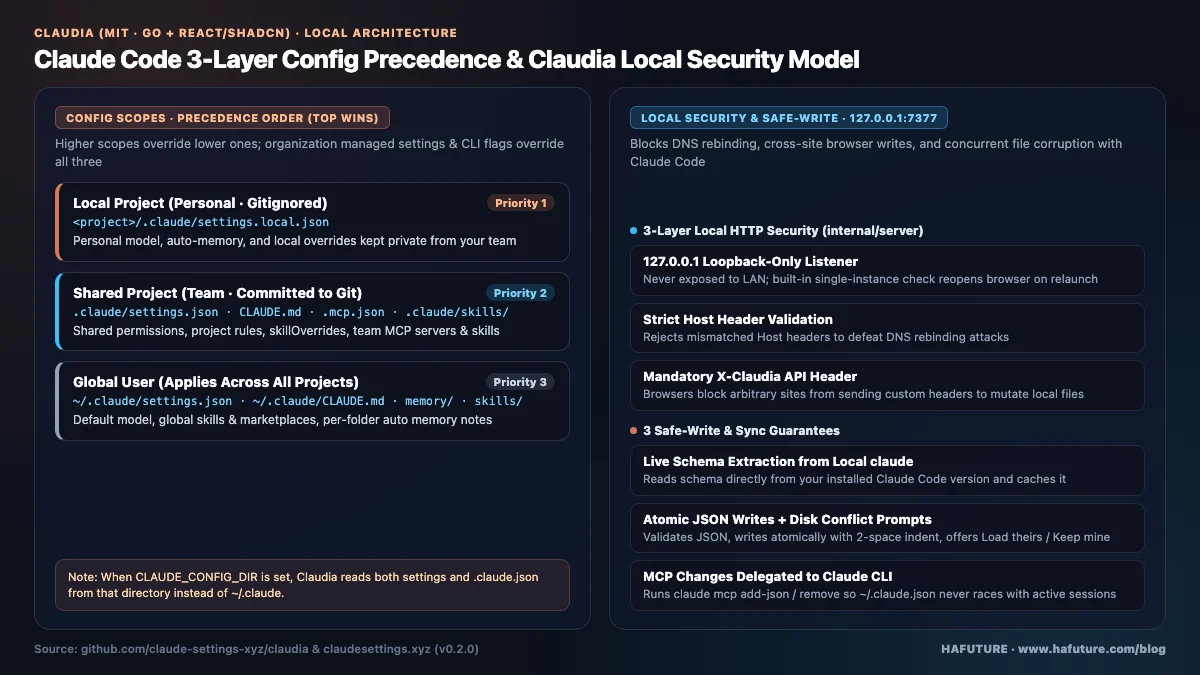
Scope Precedence Order (Highest Priority Wins)
| Priority | Scope | Managed File Paths | Sharing & Git Practice |
|---|---|---|---|
| 1st | Local Project | <folder>/.claude/settings.local.json | Personal overrides (model, auto memory), gitignored |
| 2nd | Shared Project | <folder>/.claude/settings.json, CLAUDE.md, .mcp.json, .claude/skills/ | Team permissions, repo instructions, shared MCP & skills, committed to Git |
| 3rd | Global User | ~/.claude/settings.json, ~/.claude/CLAUDE.md, ~/.claude/skills/ | Cross-project defaults, global skills & marketplaces |
- Top-level overrides: Organization Managed Settings and explicit CLI flags (
--model,--effort,--fallback-model) override all three user/project scopes. - Automatic project discovery: Claudia reads
~/.claude.jsonto find folders where you have run Claude Code, listing folders that contain a settings file orCLAUDE.mdordered by most recently used. You can also register any uninitialized directory via the⋯menu → Add project (supporting native folder pickers; on Linux, requireszenity,qarma, ormatedialog). - Custom config directories: If you export
CLAUDE_CONFIG_DIR, Claudia automatically uses that directory instead of~/.claudeand reads.claude.jsonfrom inside it.
Six Safeguards Built into internal/server and internal/claude
- Loopback-only binding (
127.0.0.1): Never listens on LAN interfaces. A built-in/api/healthsingle-instance check ensures re-runningclaudiasimply reopens your browser tab rather than spawning duplicate servers. - Strict
Hostheader check: Any HTTP request carrying a non-localHostheader is rejected immediately, neutralizing DNS rebinding attacks. - Mandatory
X-ClaudiaAPI header: Every/apirequest must includeX-Claudia. Standard browsers block arbitrary external websites from sending custom headers cross-origin, preventing drive-by pages from mutating your local config files. - Live binary schema sync: Instead of shipping a stale hardcoded list, Claudia locates
claudeon yourPATH(or~/.local/bin/claude), extracts its settings schema, and caches it per Claude Code version. - Atomic JSON writes & disk conflict alerts: Invalid JSON is refused before write, valid changes are written atomically with Claude Code's 2-space indent, and if Claude Code modified the file on disk while you were editing, Claudia halts and asks you to choose Load theirs or Keep mine.
- CLI-delegated MCP mutations: Because Claude Code actively writes to
~/.claude.jsonduring live sessions, Claudia never directly overwrites MCP blocks—it delegates changes throughclaude mcp add-jsonandclaude mcp remove, surfacing any CLI validation error directly in the UI.
3. Choosing the Right Claude Code Configuration Workflow
Claudia works best alongside—rather than completely replacing—the companion web validator and the official claude CLI.
Claudia Tray AppFocused local GUI for multi-repo Claude Code configs
“http://127.0.0.1:7377”
- Coverage
- 180 settings, CLAUDE.md, memory, MCP servers, skills, plugin toggles
- Strength
- Live schema sync with installed claude · atomic writes · conflict prompts
- Boundary
- Plugin installs, marketplace adds & skill folder deletion stay on CLI/OS
- Best For
- Desktop developers on macOS, Linux, or Windows managing 3+ repos
claudesettings.xyzZero-install plain-English reference & JSON checker
“Build / Check settings.json”
- Coverage
- All ~180 settings documented in plain English + paste-to-check validator
- Strength
- Zero install · fast search for new keys like promptCacheTtl
- Boundary
- Cannot read local repos, auto memory, or live MCP configurations
- Best For
- Locked-down corporate machines or one-off settings.json audits
Claude Code CLI + JSONHeadless automation & package lifecycle control
“claude plugin / claude mcp”
- Coverage
- Installing/updating plugins, adding marketplaces, full scriptable control
- Strength
- 100% compatible with remote SSH hosts, CI pipelines & dotfiles
- Boundary
- Tedious to hand-edit skillOverrides and 180 keys across projects
- Best For
- Remote Linux environments and companion install steps alongside Claudia
4. 4-Step Setup & CLI Flags for macOS, Linux, and Windows
Claudia v0.2.0 (released November 23, 2026) distributes prebuilt binaries for macOS (arm64/amd64), Linux (arm64/amd64), and Windows (arm64/amd64). Its installer verifies every download against the release SHA256SUMS file before wiring up autostart.
- 1Step 1: Install via the OS-native one-liner (with SHA256 verification)
install.sh / install.ps1On macOS, installs ~/Applications/Claudia.app and ~/Library/LaunchAgents/app.claudia.plist (plus a claudia symlink in /usr/local/bin or ~/.local/bin). On Linux, installs ~/.local/bin/claudia and ~/.config/autostart/claudia.desktop. On Windows, installs to %LOCALAPPDATA%\Programs\Claudia and adds a HKCU Run entry. Pass CLAUDIA_NO_AUTOSTART=1 to opt out of login startup.
- 2Step 2: Launch from terminal or system tray
claudiaRunning claudia from a shell detaches into the background, immediately returns your terminal prompt, and opens http://127.0.0.1:7377. Running it again while active detects the running instance and opens the browser tab.
- 3Step 3: Audit global defaults, privacy rules, and cache TTLs
Open the Global view (no project selected) to review ~/.claude/settings.json: enforce secret protections like permissions.deny: ["Read(./.env)"], toggle recommended privacy settings, and tune promptCacheTtl, subagentPromptCacheTtl, or maxEffortLevel.
- 4Step 4: Isolate per-project settings, skills, and MCP servers
Pick any repository in the left sidebar tree to switch between Shared (.claude/settings.json) and Local (.claude/settings.local.json), trim unused skills via skillOverrides, and scope project-specific MCP servers.
# Standard install (verifies SHA256SUMS + registers login autostart)
curl -fsSL https://raw.githubusercontent.com/claude-settings-xyz/claudia/main/install.sh | sh

# Skip login autostart or preview actions with dry-run
curl -fsSL https://raw.githubusercontent.com/claude-settings-xyz/claudia/main/install.sh | CLAUDIA_NO_AUTOSTART=1 sh
curl -fsSL https://raw.githubusercontent.com/claude-settings-xyz/claudia/main/install.sh | CLAUDIA_DRY_RUN=1 sh

# Pin a specific release tag
curl -fsSL https://raw.githubusercontent.com/claude-settings-xyz/claudia/main/install.sh | CLAUDIA_VERSION=v0.2.0 sh5. Section-by-Section Playbook: Settings, Memory, MCP, Skills & Plugins
Claudia's sidebar mirrors Claude Code's actual file model across six focused sections. Knowing what Claudia handles directly versus what it intentionally delegates to the claude CLI keeps your workflow frictionless.
| UI Section | Underlying Files / Keys | Handled Directly in Claudia | Intentionally Left to CLI / OS |
|---|---|---|---|
| Configuration | settings.json, settings.local.json | Form editor for ~180 live-synced settings (In this file / More settings), Visual ↔ JSON toggle, Shared/Local switcher, per-key Remove | Complex nested objects like hooks open an in-place JSON editor |
| CLAUDE.md | ~/.claude/CLAUDE.md, <folder>/CLAUDE.md (or .claude/CLAUDE.md) | Edit global or per-repo instructions with atomic save & conflict detection | — |
| Memory | ~/.claude/projects/<folder>/memory/ (MEMORY.md + note files) | Read, edit, and delete individual auto-memory notes; toggle autoMemoryEnabled globally or per project (.claude/settings.local.json) | MEMORY.md index itself cannot be deleted directly (Claude updates it after note deletion) |
| MCP Servers | ~/.claude.json, .mcp.json | Inspect global, local, and shared MCP servers; add/edit/remove stdio (command, args, env) and HTTP/SSE (URL, headers) via claude mcp add-json/remove | Advanced non-form fields (such as custom timeouts) are preserved untouched |
| Skills | ~/.claude/skills/<name>/SKILL.md, .claude/skills/<name>/SKILL.md, skillOverrides | Browse project + global skills, create new SKILL.md with prefilled frontmatter (+), set per-project visibility (Inherit/Default/On/Off) | Deleting a skill requires removing its folder directly |
| Plugins & Marketplaces | ~/.claude/plugins/installed_plugins.json, enabledPlugins, extraKnownMarketplaces | Browse installed & marketplace plugins, toggle global On/Off or project-level Inherit/true/false, inspect global marketplace update timestamps | Installing/updating plugins (claude plugin install <plugin>@<marketplace>) and adding marketplaces (claude plugin marketplace add) |
Three High-Leverage Habits for Daily Development
- Trim skill noise per repository: Loading dozens of global skills across every repo bloats prompt metadata and occasionally triggers irrelevant workflows. In Claudia's Skills tab, toggle off non-essential global skills per project—Claudia writes clean
skillOverridesentries so your repo stays lean alongside strategies from our Claude Code token reduction guide and mattpocock/skills 27-skill playbook. - Curate auto memory before stale habits stick: When Claude Code remembers an outdated deploy command or legacy workaround, open Memory in Claudia to edit or delete the offending note directly—or disable
autoMemoryEnabledinside.claude/settings.local.jsonfor throwaway debugging directories. (As in Claude Code itself,autoMemoryDirectoryin shared.claude/settings.jsonis ignored.) - Scope sensitive MCP servers to specific projects: Keep database or production issue-tracker MCP servers out of global
~/.claude.jsonand attach them only to the relevant repo scope via Claudia's MCP Servers tab. Combining project-scoped MCP servers with Code Mode & Background MCP Tasks cuts both accidental cross-repo access and unnecessary tool round-trips.
6. Troubleshooting & Practical Guardrails Explorer
Use the interactive filter below to resolve the most common Claudia installation, schema, and scope questions.
- Configuration form reports it cannot read the Claude Code schemaCommon· Schema & Conflicts
Claudia extracts the settings schema directly from your installed Claude Code binary rather than bundling a static copy. If extraction fails, switch to the JSON tab to keep editing immediately while fixing PATH.
Primary Fix:Verify claude is on PATH or at ~/.local/bin/claude, then click Refresh next to Visual/JSONTip / Alternative:Browse the live 180-setting reference online at https://claudesettings.xyz/settings - Save blocked because the file changed on disk since you started editingData Safety· Schema & Conflicts
When an active Claude Code session updates settings.json or SKILL.md concurrently, Claudia refuses to silently clobber disk changes and pauses for your explicit decision.
Primary Fix:Choose Load theirs to accept Claude Code's newer disk version, or Keep mine to overwrite intentionallyTip / Alternative:Click Refresh in long-lived browser tabs before starting a batch of manual JSON edits. - A repository folder does not appear in Claudia's left sidebarUX Tip· Scopes & Boundaries
Claudia reads ~/.claude.json and automatically displays only folders that already have a settings file or CLAUDE.md. Your home directory is intentionally excluded because it maps to the Global view.
Primary Fix:Open the ⋯ menu next to the filter and select Add project (type path or use Select folder)Tip / Alternative:On Linux, install zenity, qarma, or matedialog if the native Select folder dialog does not open. - Port 7377 is already taken by another app or you want to disable login autostartPort Config· Install & Runtime
If another Claudia instance holds 7377, running claudia simply opens its UI tab. If a different local service occupies 7377, pass -port to move Claudia to a free loopback port.
Primary Fix:Run claudia -port 7388 -no-open, or reinstall with CLAUDIA_NO_AUTOSTART=1Tip / Alternative:Use claudia -foreground to inspect startup and HTTP errors directly in your terminal. - No button to install new plugins, add marketplaces, or delete skill foldersDesign Limit· Scopes & Boundaries
Claudia deliberately avoids remote package installation and destructive folder deletion to stay small and auditable—focusing strictly on inspecting, editing, and toggling configurations.
Primary Fix:Run claude plugin install / marketplace add in your terminal, or delete the skill folder manuallyTip / Alternative:After running a CLI install, click Refresh in Claudia to see the updated installed_plugins.json immediately.
7. Frequently Asked Questions (FAQ)
Q1. Is Claudia an official Anthropic tool?
Q2. Is this the same app as the 2025 Tauri-based Claudia (getAsterisk/claudia)?
Q3. Does Claudia work with custom CLAUDE_CONFIG_DIR profiles?
Q4. Is running a local HTTP UI on 127.0.0.1:7377 safe on shared Wi-Fi or while browsing?
Q5. Are there similar minimal tools for Codex CLI or multi-account CLI switching?
Related Claude Code Guides
- Claude Code 'Code Mode' & Background MCP Tasks Guide — Pair project-scoped MCP servers in Claudia with Code Mode and background execution to eliminate tool round-trip overhead.
- mattpocock/skills Guide: 27 AI Skills for Real Vibe Coding — Install battle-tested skills globally, then use Claudia's Skills tab to turn only the relevant subset on per repository.
- Reduce Tokens in Claude Code — Combine prompt cache TTL tuning, lean
CLAUDE.mdfiles, and per-project skill overrides to cut daily token spend.
Validate Claude Code hooks, settings.json & .mcp.json in Your Browser
Before pasting complex hooks or custom MCP definitions into Claudia's inline JSON editor, catch stray commas, broken braces, and formatting issues instantly with the Hafuture JSON Formatter.