Claude Code 'Code Mode' & Background MCP Tasks Guide: Cut Tool Round-Trips and Token Waste
Learn how to enable Claude Code Code Mode (v2.1.323+) JS batch tool execution and Background MCP Tasks & Elicitations (v2.1.304+), with safe hook guardrails.
Table of Contents
- 1. Why Code Mode and Background MCP Tasks Matter Now
- 2. Pick the Right Execution Mode for Your Workflow
- 3. Enabling Code Mode & Requirements (4-Step Setup)
- 4. Permissions, Sandboxing & Pre/PostToolUse Hook Guardrails
- 5. Mastering Background MCP Tasks & Elicitations
- 6. Troubleshooting & Real-World Scenario Matcher
- 7. Frequently Asked Questions (FAQ)
1. Why Code Mode and Background MCP Tasks Matter Now
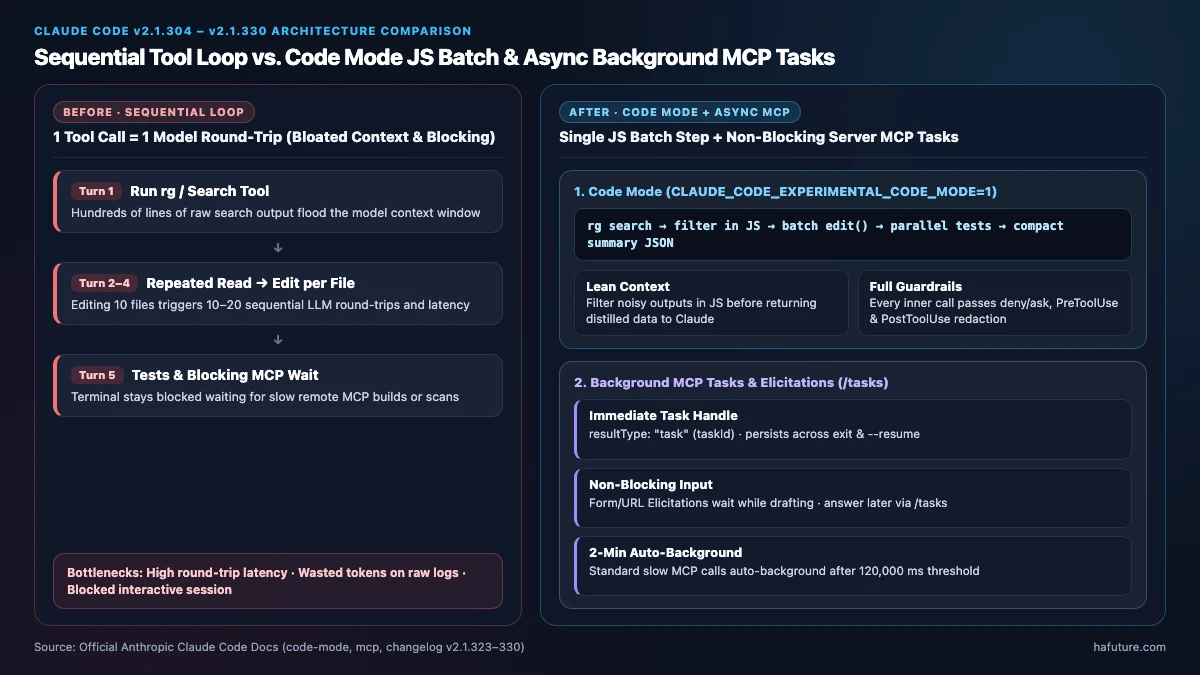
Anyone running an AI coding agent on a production repository eventually hits two structural bottlenecks. First is sequential tool-loop overhead: when updating 15 files and running targeted tests, a classic agent loop fires rg, dumps hundreds of raw lines into the context window, then burns 15–30 model round-trips alternating between Read, Edit, and Bash. Second is terminal blocking during slow MCP calls: invoking a remote CI build, database migration, or vulnerability scan freezes your interactive session until the server finally responds.
Claude Code now tackles both bottlenecks natively. Introduced in v2.1.323, experimental Code Mode lets Claude write a JavaScript block (REPL) that chains, filters, or parallelizes multiple tool calls in a single step and returns only the distilled result to the model context. Meanwhile, automatic 2-minute MCP backgrounding (v2.1.212) and server-side MCP Tasks & Elicitations (v2.1.304+) offload long-running remote MCP work asynchronously—even surviving session exit and --resume.
What a Code Mode JavaScript Block Actually Looks Like
Here is the canonical pattern from Anthropic's official Code Mode documentation—collapsing search, edit, and test execution into a single step:
const files = await $`rg -l "function retryPolicy" src`.text();
const target = files.trim().split("\n")[0];
await edit(target, "maxAttempts: 3", "maxAttempts: 5");
({ edited: target, tests: $`npm test -- retryPolicy`.nothrow() });
In the main conversation view, you still see normal diffs and tool summaries rather than raw script clutter. Whenever you want to audit the exact JavaScript Claude executed, press Ctrl+O to open the transcript viewer and expand the collapsible Code row.
2. Pick the Right Execution Mode for Your Workflow
Code Mode is a major speed and token upgrade for batch work, but it does not fit every environment (such as cloud gateways, HIPAA/ZDR accounts, or IDE panels). Use the selector below to choose the cleanest architecture for your setup.
Code Mode (JS Batch Execution)Combine chained or parallel tool calls into one JS step
“Cut round-trip latency and stop raw logs from polluting context”
- Requirement
- v2.1.323+ native build · CLAUDE_CODE_EXPERIMENTAL_CODE_MODE=1
- Supported Models
- Claude Opus 5.5 · Sonnet 5.5 · Haiku 5.5 · Fable 5.2
- Best For
- Multi-file edits, pre-filtered rg searches, parallel test/lint runs
- Key Caveat
- Interactive terminal only · must keep flag on to --resume
Background MCP & Server MCP TasksOffload slow MCP calls asynchronously and track via /tasks
“Non-blocking remote tools that survive terminal exit and resume”
- Requirement
- Auto-background (v2.1.212+, 2 min) · Server MCP Tasks (v2.1.304+)
- Persistence
- Server MCP tasks persist in ~/.claude/projects/.../mcp-tasks/
- Mid-Task Prompts
- Form & URL Elicitations · waits while drafting · /tasks answer-later
- Key Env Vars
- CLAUDE_CODE_MCP_AUTO_BACKGROUND_MS · CLAUDE_CODE_DISABLE_MCP_TASK_BACKGROUND
Standard Tool Loop + Tool SearchMaximum compatibility across cloud routers, IDEs, and regulated orgs
“Reliable everywhere with deferred MCP schemas via ENABLE_TOOL_SEARCH”
- Supported Surfaces
- Bedrock · Vertex/GCP · Foundry · VS Code · Desktop · -p print mode
- Token Tuning
- ENABLE_TOOL_SEARCH=auto:5 to defer large MCP tool definitions
- Full Features
- Remote Control · Claude in Chrome · computer use · /fork background
- Best For
- Enterprise ZDR/HIPAA teams and IDE-centric workflows
3. Enabling Code Mode & Requirements (4-Step Setup)
Because Code Mode is experimental and opt-in, Claude Code silently falls back to standard mode if any requirement is missing. Crucially, Claude Code ignores CLAUDE_CODE_EXPERIMENTAL_CODE_MODE inside project or local settings (.claude/settings.json and .claude/settings.local.json) so cloned repositories cannot silently opt you in.
Official Requirements Checklist
| Requirement | Supported Configuration | Limitations / Notes |
|---|---|---|
| Version & Build | Claude Code v2.1.323+ native build | Agent Teams requires v2.1.326+ (in-process mode only, not split panes) |
| Account / Routing | Direct Anthropic API (Claude subscription or Console) | No Bedrock, Google Cloud, Foundry, LLM gateways, HIPAA, or ZDR orgs |
| Models | Opus 5.5, Sonnet 5.5, Haiku 5.5, or Fable 5.2 | Older models fall back to standard mode |
| Surface | Interactive terminal claude (Git for Windows on Windows) | No -p, Agent SDK, VS Code, Desktop, Cloud, Remote Control, Chrome, or computer use |
| Telemetry / Helpers | No apiKeyHelper, DISABLE_TELEMETRY, or OTel tracing | v2.1.329+ supports OTel events & metrics (tracing still disables Code Mode) |
- 1Verify native build and update Claude Code
claude --version && claude updateEnsure you are on at least v2.1.323. Upgrading to v2.1.328+ excludes permission-prompt wait time from the 10-minute foreground limit, and v2.1.329+ adds OTel events/metrics compatibility.
- 2Test in a single interactive session first
CLAUDE_CODE_EXPERIMENTAL_CODE_MODE=1 claudeConfirm the startup banner reads: 'Code Mode (experimental) is on · this session can be resumed only with Code Mode on'.
- 3Run a multi-tool task and inspect scripts with Ctrl+O
Ctrl+O (toggle transcript viewer)Try a batch task like checking broken local links across all Markdown files, then press Ctrl+O to audit the collapsible Code row.
- 4Persist in user settings with explicit safety rules
~/.claude/settings.jsonOnce verified, place the env variable in your global user settings (~/.claude/settings.json)—never in a repo's .claude/settings.json—and pair it with ask/deny rules.
CLAUDE_CODE_EXPERIMENTAL_CODE_MODE=1 claude             # Start a single Code Mode session
CLAUDE_CODE_EXPERIMENTAL_CODE_MODE=1 claude --continue  # Continue last Code Mode session
CLAUDE_CODE_EXPERIMENTAL_CODE_MODE=1 claude --resume # Pick a Code Mode session to resume4. Permissions, Sandboxing & Pre/PostToolUse Hook Guardrails
Running tool calls inside JavaScript does not bypass Claude Code's permission system. Every individual Bash, Edit, or MCP call executed by a script still flows through your deny / ask permission rules and PreToolUse hooks under its standard tool name. However, pairing Code Mode with Auto mode introduces a critical nuance.
Four Guardrails Worth Enabling Immediately
- Approve every JS block before execution (
"REPL"): Adding"REPL"topermissions.askprompts you to inspect each script before it runs. While a script is executing, answeringNoor pressingEschalts the script (keeping already-finished edits), whereas choosing No with a comment rejects only that inner call so the rest of the script can continue. - Set
onFailureonPreToolUsehooks: If aPreToolUsehook times out or exits abnormally during Code Mode, Claude Code refuses the tool call ("the hook did not finish"/"the hook failed"). Explicitly set"onFailure": "block"on security guard hooks and"onFailure": "continue"on non-critical telemetry hooks. - Redact secrets in
PostToolUseonREPL: To scrub tokens or credentials before Claude reads script output, inspecttool_response(code,result,stdout,stderr,toolsUsed) in aPostToolUsehook and return a sanitizedupdatedToolOutputwhile preserving the exact string field shape (code,stdout,stderr). - Always return the redacted copy even when blocking or catching errors: If a
PostToolUsehook returns"decision": "block"withoutupdatedToolOutput—or crashes with invalid JSON—Claude falls back to reading the original unredacted output.
{
  "hookSpecificOutput": {
    "hookEventName": "PostToolUse",
    "updatedToolOutput": {
      "code": "(await $`cat notes.txt`.text())",
      "result": "deploy token: REDACTED",
      "stdout": "",
      "stderr": "",
      "toolsUsed": ["Bash"]
    }
  }
}
Foreground (10 Min) vs. Background Code (2 Hours)
In foreground (waiting) execution, a Code Mode script stops after 10 minutes (starting in v2.1.328, time spent waiting on a permission prompt in Manual or acceptEdits mode no longer counts against that limit). In auto or bypassPermissions mode, scripts can run in the background for up to 2 hours while you continue conversing with Claude. Press Esc or open /tasks and press x to cancel running code at any time.
5. Mastering Background MCP Tasks & Elicitations
While Code Mode optimizes local and multi-step tool orchestration, Background MCP and Server-Side MCP Tasks solve the opposite problem: remote MCP calls that take minutes or hours (CI pipelines, large indexing jobs, external approvals). Knowing how the two tiers differ prevents lost work and unexpected timeouts.
| Capability | Auto-Backgrounded MCP Call (v2.1.212+) | Server-Side MCP Tasks (v2.1.304+) |
|---|---|---|
| When it backgrounds | Automatically after 2 minutes (120000 ms) | Immediately when server returns "resultType": "task" |
Survives exit / --resume | No (ends when session closes) | Yes (state saved in ~/.claude/projects/<project>/<session>/mcp-tasks/) |
| Timeouts | Bound by MCP_TOOL_TIMEOUT & CLAUDE_CODE_MCP_TOOL_IDLE_TIMEOUT | No Claude Code wall-clock or idle timeout once backgrounded |
| Scope | Main-conversation calls only (no subagents / IDE servers) | Terminal CLI, Agent SDK, GitHub Actions (2026-07-28 protocol) |
| Management | Inspect / stop via /tasks | Live status (working, input_required, completed) & replies in /tasks |
How MCP Elicitations (input_required) Work Without Interrupting You
When a server-side MCP task needs human input mid-run, it transitions to status: "input_required" and issues an MCP Elicitation. Claude Code declares two modes:
- Form mode: Renders structured input fields directly in the terminal for parameters or approvals.
- URL mode: Prompts you to open an out-of-band browser link (such as OAuth sign-in).
- Draft-safe UX: If a background MCP task sends a question while you are actively typing a prompt, Claude Code waits until you send or clear your draft. Dismissing the prompt marks it as "answer later" inside
/tasks.
CLAUDE_CODE_MCP_AUTO_BACKGROUND_MS=45000 claude                     # 1) Auto-background plain MCP calls after 45s (default 120000 ms)
CLAUDE_CODE_MCP_AUTO_BACKGROUND_MS=0 claude                         # 2) Disable auto-backgrounding (waits for MCP tasks too)
CLAUDE_CODE_DISABLE_MCP_TASK_BACKGROUND=1 claude                    # 3) Wait synchronously for server MCP tasks (v2.1.304+, 2m fallback)
CLAUDE_AUTO_BACKGROUND_TASKS=1 claude -p --input-format stream-json # 4) Enable background MCP tasks in headless CI6. Troubleshooting & Real-World Scenario Matcher
Filter common Code Mode and Background MCP issues below to find exact fixes straight from the official release notes and docs.
- I set CLAUDE_CODE_EXPERIMENTAL_CODE_MODE=1, but Code Mode does not startMost Common· Code Mode Startup & Sessions
Claude Code ignores the flag in project/local settings for security. It also refuses to start below v2.1.323, on older models, or when apiKeyHelper, DISABLE_TELEMETRY, or OTel tracing (ENABLE_BETA_TRACING_DETAILED) is active.
Recommended Fix:Run /status to see the exact blocker and move the variable to ~/.claude/settings.jsonAlternative / Note:Verify direct Anthropic API (no Bedrock/gateway/apiKeyHelper/DISABLE_TELEMETRY/OTel tracing) - Resuming yesterday's Code Mode session via claude --resume fails or drops background scriptsSessions· Code Mode Startup & Sessions
Code Mode sessions can only be resumed in the terminal with Code Mode enabled. Sessions started without Code Mode always resume without it.
Recommended Fix:Run CLAUDE_CODE_EXPERIMENTAL_CODE_MODE=1 claude --resume on v2.1.328+Alternative / Note:On older versions, use --continue instead of the --resume picker - A script fails with 'Tool call refused by a hook (the hook did not finish)'Hooks· Permissions & Hooks
Timeouts or non-zero crash exits (126, 127, >128) in PreToolUse hooks reject calls inside Code Mode scripts. Update to v2.1.328+ and move code-output inspection to PostToolUse on REPL.
Recommended Fix:Increase PreToolUse timeout and set "onFailure": "block" for guard hooksAlternative / Note:Replace indecisive agent hooks with deterministic command hooks; move output checks from UserPromptSubmit to PostToolUse - A large migration script hits the 10-minute foreground cap and stops earlyLong Jobs· Code Mode Startup & Sessions
Foreground Code Mode scripts stop after 10 minutes, while auto and bypassPermissions modes allow background execution for up to 2 hours.
Recommended Fix:Launch with claude --continue --permission-mode auto for up to 2 hours in the backgroundAlternative / Note:Press Shift+Tab to return to the permission mode you started in; avoid passing --tools - An internal Java MCP server rejects Claude Code's connection handshakeCompatibility· Background MCP & Elicitations
Java MCP SDK versions 0.11.0 through 0.17.0 fail to parse the form and url elicitation modes that Claude Code advertises during initialization.
Recommended Fix:Upgrade the server past Java MCP SDK 0.17.0Alternative / Note:Test temporarily with MCP_PROTOCOL_NEGOTIATION=legacy while upgrading - I worry an MCP server asking an Elicitation question will hang my CI pipelineCI Safety· Background MCP & Elicitations
With denyInsteadOfPrompting enabled, any elicitation not handled by a hook is immediately cancelled instead of blocking an unattended run.
Recommended Fix:Set permissions.denyInsteadOfPrompting: true (v2.1.319+)Alternative / Note:Provide an Elicitation hook or TypeScript Agent SDK onElicitation callback for automated answers
7. Frequently Asked Questions (FAQ)
Q1. Does enabling Code Mode force Claude to write JavaScript for every single prompt?
Q2. Why doesn't CLAUDE_CODE_EXPERIMENTAL_CODE_MODE work inside my repo's .claude/settings.json?
Q3. Is Auto mode safe with Code Mode turned on?
Q4. What is the main difference between 2-minute auto-backgrounding and Server-Side MCP Tasks?
Q5. Can I use Code Mode in the VS Code panel or Claude Desktop app?
Q6. Does Code Mode work together with Agent Teams?
Validate ~/.claude/settings.json & Hook JSON with Hafuture JSON Formatter
A single syntax typo in settings.json or PostToolUse updatedToolOutput JSON causes Claude Code to fall back to defaults or skip redaction. Format and validate your JSON right in the browser before applying.