Thinking Machines Inkling 2 Mini Local Guide: Run a 26.4B Looped Transformer with 1M Context on a 32GB Mac
Run Thinking Machines' Apache 2.0 26.4B Looped Transformer Inkling 2 Mini locally on a 32GB Mac or single GPU with Ollama, Unsloth, llama.cpp, and vLLM.
Table of Contents
- 1. Why Inkling 2 Mini Changes Local AI Workflows
- 2. Looped Transformer Architecture and Benchmark Breakdown
- 3. Pick the Right Runtime and Quantization for Your Hardware
- 4. Step-by-Step Local Setup Commands
- 5. Quantization Sizes and 1M Context Memory Tuning
- 6. Troubleshooting and Official Limitations Matcher
- 7. Frequently Asked Questions (FAQ)
1. Why Inkling 2 Mini Changes Local AI Workflows
Running a genuinely capable coding and multimodal agent locally has long forced an awkward trade-off: compact 7B–14B models feel snappy on laptops but crumble on multi-file debugging, while 70B+ open weights demand 64GB–128GB workstations before you can even load a useful context window.
Released on November 20, 2026 by Mira Murati's Thinking Machines Lab, Inkling 2 Mini breaks that ceiling with an uncommon architectural bet: instead of storing 48 separate decoder layers on disk, it ships 24 physical layers (~20GB total in native NVFP4/MXFP8) and executes its middle 12 layers three times per token with shared weights.
- Apache 2.0 + Native Multimodal: Accepts UTF-8 text and pixel images (encoded via a 23-layer ViT; optimal dimensions
40pxto4096px) with a 1M-token (1,048,576) context window, open for commercial deployment and fine-tuning. - Zero Post-Training Quantization Tax: Routed experts in layers 0–19 are trained natively in NVFP4 and layers 20–23 in MXFP8, shipping as a single ~20GB checkpoint that already includes a 0.6GB DSpark speculative drafter.
- Where It Fits Alongside Frontier Cloud Models: Rather than replacing massive cloud flagships covered in our November 2026 Frontier AI Showdown (Gemini 4 Neon vs. GPT-6.2 vs. Claude Fable 5.2), Inkling 2 Mini shines as a zero-marginal-cost offline coding agent, GUI vision model, and long-document analyzer running privately on a 32GB Mac or a single 24GB–32GB GPU.
2. Looped Transformer Architecture and Benchmark Breakdown
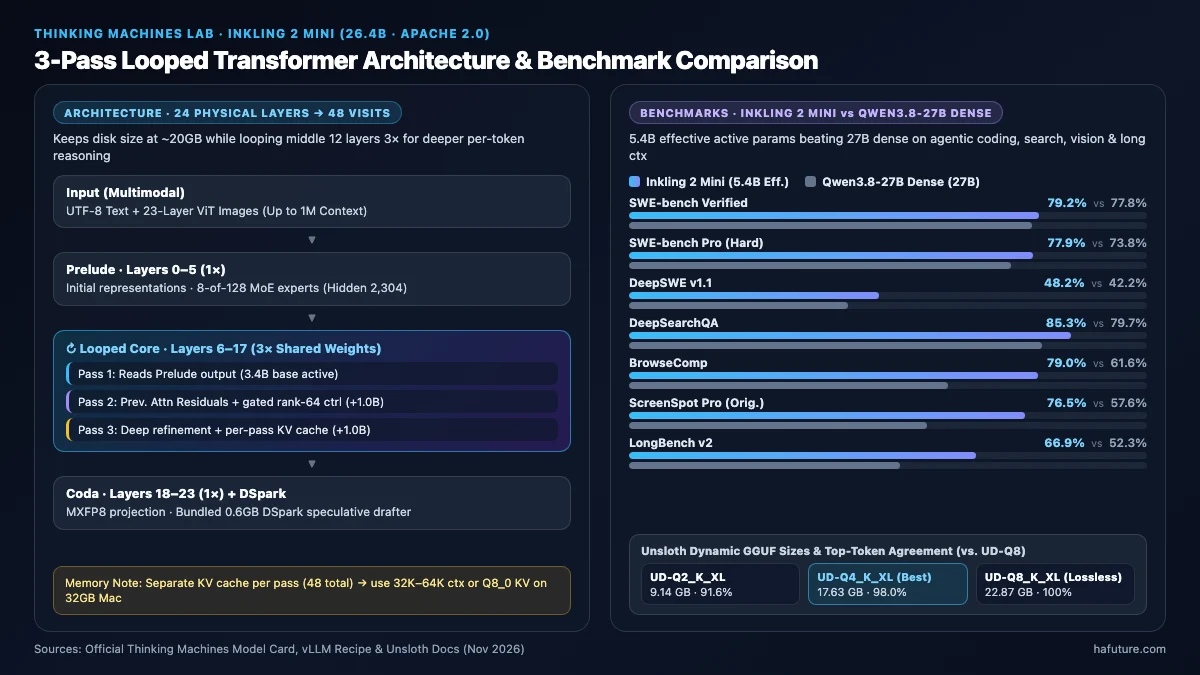
The headline spec—26.4B total parameters, 3.4B active, 5.4B effective active—often trips developers up on first read. Here is how the 24 physical layers translate into 48 logical layer visits per generated token.
Inside the 3-Pass Execution Pipeline
Per the official Thinking Machines model card and vLLM recipe:
- Prelude (Layers 0–5, 1× pass): Projects text tokens and 23-layer ViT image embeddings into a shared hidden space (hidden size
2,304) to build initial representations. - Looped Core (Layers 6–17, 3× passes with shared weights): Sparse MoE routes each token to 8 of 128 experts per layer. Pass 1 activates ~3.4B unique weights; Passes 2 and 3 read both the prelude output and a message from the previous pass's two attention-residual blocks via a gated rank-64 controller, adding ~1.0B effective active parameters per extra pass for 5.4B effective active parameters per token.
- Coda (Layers 18–23, 1× pass) + DSpark: Projects final hidden states in MXFP8 while the bundled DSpark speculator drafts upcoming tokens to boost decode throughput.
- Independent Per-Pass KV Caches (48 total): Hybrid attention mixes 20 sliding-window local layers and 4 global full-attention layers (24 query heads, 8 KV heads) plus 4 short convolutions. Crucially, each loop pass maintains its own KV cache and conv-state cache (48 of each)—a vital detail when sizing context length on 32GB machines.
Official Benchmarks vs. Qwen3.8-27B Dense
| Domain | Benchmark | Inkling 2 Mini (5.4B Eff.) | Qwen3.8-27B Dense (27B) | Practical Takeaway |
|---|---|---|---|---|
| Coding & Agents | SWE-bench Verified | 79.2% | 77.8% | Leads sub-100B open weights |
| Coding & Agents | SWE-bench Pro (Hard) | 77.9% | 73.8% | +4.1 pts on tough multi-file patches |
| Coding & Agents | DeepSWE v1.1 | 48.2% | 42.2% | +6.0 pts on deep agentic debugging |
| Coding & Agents | Terminal Bench v2.1 | 71.6% | 73.0% | Dense Qwen3.8 edges out in shell tasks |
| Search & Tools | MCP Atlas / DeepSearchQA | 82.7% / 85.3% | 77.3% / 79.7% | Strong MCP tool calling & synthesis |
| Search & Tools | BrowseComp | 79.0% | 61.6% | Major gain on agentic web research |
| Vision & Docs | OmniDocBench v1.6 | 92.8% | 91.5% | Top-tier PDF, table & chart OCR |
| Vision & Docs | ScreenSpot Pro (Orig. / Python) | 76.5% / 87.7% | 57.6% / 78.9% | Built for GUI grounding & computer use |
| Long Context | LongBench v2 | 66.9% | 52.3% | Excels across long repos and reports |
| Factual Recall | GPQA Diamond / AA-Omniscience (non-halluc.) | 86.6% / 63.4% | 90.5% / 71.4% | Static trivia favors denser weights |
Independent testing on the Artificial Analysis Intelligence Index v5.0.1 scored Inkling 2 Mini at 20.1—tying dense Qwen3.8-27B (xhigh) while using roughly 2.8× less compute, finishing ~4× faster, and costing ~6× less per task. Just keep the architectural trade-off in mind: looping boosts reasoning depth, not parametric memorization, so always ground factual lookups with search or RAG.
3. Pick the Right Runtime and Quantization for Your Hardware
While Inkling 2 Mini has day-one support across Ollama, Unsloth Desktop, llama.cpp, MLX, vLLM, and SGLang, platform compatibility varies. Most notably, the official ollama run inkling-2-mini library tag currently targets Apple Silicon Macs only (via Ollama's MLX runner); Windows and Linux users should reach for Unsloth, llama.cpp, or vLLM instead.
Ollama (MLX)Zero-friction native run on 32GB+ Apple Silicon Macs
“ollama run inkling-2-mini”
- Platform
- macOS Apple Silicon only (MLX backend)
- Checkpoint
- Native NVFP4/MXFP8 single tag (~20GB)
- Key Strength
- No post-quant loss · instant ollama launch coding agent integration
- Tuning Tip
- Keep active context around 32K–64K on 32GB Macs to avoid swap
Unsloth / llama.cppCross-platform speed leader for 16GB–32GB machines
“UD-Q4_K_XL (17.63GB, 98.0% match)”
- Platform
- macOS · Windows · Linux (Metal / CUDA 12 / ROCm / Vulkan)
- Checkpoint
- Dynamic GGUFs from 7.76GB (IQ1_S) to 22.87GB (UD-Q8_K_XL)
- Key Strength
- Unsloth b12649-mix + DSpark + Q8_0 KV cache (up to 1.9x faster)
- Tuning Tip
- Use UD-Q2_K_XL on 16GB, UD-Q3_K_XL on 24GB, UD-Q4_K_XL on 32GB
vLLM Nightly (TP1)Production single-GPU OpenAI API serving
“vllm serve thinkingmachines/Inkling-2-Mini”
- Platform
- NVIDIA Blackwell (B200/GB200/DGX Spark) · Hopper (H100/H200)
- Checkpoint
- Native NVFP4/MXFP8 + DSpark speculator (7 draft tokens)
- Key Strength
- Up to ~4,400 output tok/s on 1× GB200 · built-in inkling parser
- Tuning Tip
- Cap --max-model-len at 262144 on H100 and DGX Spark
4. Step-by-Step Local Setup Commands
Follow these four steps to get Inkling 2 Mini running cleanly on Apple Silicon, desktop GPUs, or a production vLLM node.
- 1Step 1: Verify Runtime Builds with Looped-Layer Support
Looped layers and per-expert NVFP4 scales landed on November 20–21, 2026. Update Ollama to the latest release, use mainline llama.cpp b12600+ (with PR #32704) or Unsloth's b12649-mix prebuilt, or pull vLLM 0.35.0+ nightly.
- 2Step 2: Pull the Right Model Files
On 32GB+ Macs, 'ollama run inkling-2-mini' pulls the complete 20GB NVFP4/MXFP8 bundle automatically. With llama.cpp, grab UD-Q4_K_XL (17.63GB), plus optional mmproj-F16.gguf (639MB) for vision and dspark-Inkling-2-Mini-Q8_0.gguf (~0.4GB) for speculative decoding.
- 3Step 3: Apply Recommended Sampling & Q8_0 KV Cache
Unsloth recommends temp 1.0, top-p 1.0, top-k 0, and min-p 0.0. On 32GB unified memory or 24GB GPUs, enable --cache-type-k q8_0 --cache-type-v q8_0 to double context headroom with minimal speed loss.
- 4Step 4: Wire Into Coding Agents Safely
Ollama exposes built-in launchers for Claude Code, OpenCode, and OpenClaw. Because Thinking Machines warns that Inkling 2 Mini can occasionally loop during debugging or overwrite files without asking, always run agent workloads inside a sandbox with explicit max-token and turn caps.
ollama run inkling-2-mini                        # Interactive chat (default latest · 20GB)
ollama launch claude --model inkling-2-mini      # Connect to Claude Code locally
ollama launch opencode --model inkling-2-mini    # Connect to OpenCode
ollama launch openclaw --model inkling-2-mini # Connect to OpenClaw5. Quantization Sizes and 1M Context Memory Tuning
Because layers 0–19 were trained natively in NVFP4 and only layers 20–23 remain in MXFP8, Inkling 2 Mini retains unusually high fidelity even in compact GGUF quants. Below are Unsloth's published KLD and top-token agreement figures measured against UD-Q8_K_XL (lossless reference keeping native NVFP4 experts and BF16 remaining weights):
GGUF Quant (unsloth/Inkling-2-Mini-GGUF) | File Size | Mean KLD | Top-Token Agreement | Est. RAM + VRAM | Best Use Case |
|---|---|---|---|---|---|
UD-IQ1_S | 7.76 GB | 0.0911 | 89.4% | 9 GB+ | Ultra-low-RAM testing |
UD-IQ2_XXS | 8.49 GB | 0.0726 | 90.6% | 10–11 GB | Minimal footprint on 16GB laptops |
UD-Q2_K_XL | 9.14 GB | 0.0595 | 91.6% | 10–11 GB | Practical floor for 16GB Macs |
UD-Q3_K_XL | 13.63 GB | 0.0174 | 96.3% | 13–15 GB | Sweet spot for 16GB GPUs / 24GB Macs |
UD-Q4_K_M | 16.61 GB | 0.0108 | 97.9% | 17–18 GB | Tight 24GB VRAM setups |
UD-Q4_K_XL (Recommended) | 17.63 GB | 0.0107 | 98.0% | 17–18 GB+ | Default choice for 32GB Macs & 24GB GPUs |
UD-Q8_K_XL (Reference) | 22.87 GB | 0 (Ref.) | 100% | 24 GB+ | Lossless quality on 36GB+ Macs / 32GB+ GPUs |
Managing the 48-Layer KV Cache on 32GB Systems
Although Inkling 2 Mini supports 1M tokens architecturally, each of the three loop passes owns an independent KV cache and conv-state cache (48 layers total), and llama.cpp allocates roughly ~96 KB of compute buffer per token of context. Attempting to open a full 1M-token window on a 32GB Mac will trigger heavy disk swap.
- Recommended 32GB Mac Budget: Cap
--ctx-sizeat32768–65536and enable--cache-type-k q8_0 --cache-type-v q8_0. Expect ~20–27 tok/s on 32GB+ Apple Silicon via MLX, and up to 1.9× faster GGUF decoding on Unsloth's optimizedllama.cppbuilds compared to mainline. - Local vs. Tinker API Break-Even: First-party Thinking Machines Tinker API pricing sits at $0.15 / 1M input ($0.015 / 1M cached) and $0.50 / 1M output. A smart hybrid pattern is running everyday private coding and vision loops locally for $0, and bursting 256K–1M repo-wide audits to Tinker or vLLM when needed.
6. Troubleshooting and Official Limitations Matcher
Select the exact issue you hit during setup or agent runs to see the verified fix from official Thinking Machines, Unsloth, and llama.cpp docs.
- 'ollama run inkling-2-mini' does not work on Windows or LinuxCommon· Runtime & Build
The official Ollama inkling-2-mini package currently runs on Apple Silicon Macs only via the MLX backend. On Windows/Linux, install Unsloth Desktop or run unsloth/Inkling-2-Mini-GGUF with Unsloth prebuilt llama.cpp.
Primary Fix:Use Unsloth Desktop or Unsloth llama.cpp (CUDA 12 / ROCm / Vulkan)Alternative / Tip:On NVIDIA data center GPUs (H100/B200/DGX Spark), serve native NVFP4/MXFP8 via vLLM nightly Docker - llama.cpp outputs corrupted text or gibberish tokensMust Check· Runtime & Build
Older llama.cpp builds lack Looped Transformer layer routing and per-expert NVFP4 scale support. Check ./llama-server --version and re-download any GGUFs fetched before the Nov 23, 2026 refresh.
Primary Fix:Upgrade to mainline llama.cpp b12600+ (PR #32704) or Unsloth b12649-mixAlternative / Tip:Verify unsloth/Inkling-2-Mini-GGUF file integrity with hf download to clear stale cached shards - Heavy swap and sudden slowdown when raising context on a 32GB Mac32GB Mac Key· Memory & Speed
Because layers 6–17 execute 3 times with separate per-pass KV caches (48 total), long contexts consume significantly more memory than standard 24-layer models. Q8_0 KV halves cache memory at just 3–7% decode cost.
Primary Fix:Set --ctx-size 32768–65536 with --cache-type-k q8_0 --cache-type-v q8_0Alternative / Tip:Drop --mmproj if text-only (saves 639MB), or switch from UD-Q4_K_XL to UD-Q3_K_XL (13.63GB) - Model gets stuck in long repetitive reasoning loops while debuggingOfficial Limit· Agent & Limits
Per Thinking Machines' official model card, Inkling 2 Mini can enter extended self-verification loops during debugging, and setting reasoning effort to minimal does not fully disable reasoning.
Primary Fix:Enforce client-side max_tokens (4096–8192) and agent max-turn capsAlternative / Tip:Split large refactors into single-file or single-function prompts instead of open-ended sweeps - Local coding agent overwrites or deletes files without askingSafety First· Agent & Limits
The official model card warns that Inkling 2 Mini follows repo conventions less reliably than frontier models and may perform destructive file edits without confirmation.
Primary Fix:Run inside a sandbox/container or isolated Git worktree with manual approval gatesAlternative / Tip:Keep a clean Git commit before each agent run and require confirmation for rm or git reset --hard
7. Frequently Asked Questions (FAQ)
Q1. Why is Inkling 2 Mini listed as both 3.4B active and 5.4B effective active?
Q2. Can I run Inkling 2 Mini on a 16GB RAM MacBook?
Q3. How does it perform on non-English languages?
Q4. What is the companion TML-d24-varloop-research checkpoint?
Q5. Can I fine-tune Inkling 2 Mini commercially?
Related Local AI & Cost Guides
- Hex App Guide: Free Local-First Voice Dictation for Desktop — Combine offline speech-to-text on Apple Silicon with local Inkling 2 Mini inference for a 100% private Mac workflow.
- OpenClaw Token Cost Analysis — Compare running
ollama launch openclaw --model inkling-2-minilocally at $0 marginal cost against hosted LLM API tiers. - Gemini 4 Neon vs GPT-6.2 (Astra & Sol) vs Claude Fable 5.2: November 2026 AI Guide — Decide when a local 26.4B looped model is enough and when to escalate to frontier cloud models.
Validate vLLM speculative-config & OpenAI-Compatible Payloads with Hafuture JSON Formatter
A single misplaced quote in --speculative-config JSON or a multimodal image_url API payload causes vLLM or llama-server to reject the request. Format and validate your JSON cleanly in the browser before launching.